
|
Symphony Spring Release: What’s New and What It Means Boxlight Partner Resource — April 2026 |
|
The Symphony Spring Release extends the platform in four meaningful ways. Existing installations update in place. New systems ship with all capabilities included. |
The platform now sees the building
Symphony has always managed communication across a campus. What it didn’t do was show you the state of that infrastructure in real time.
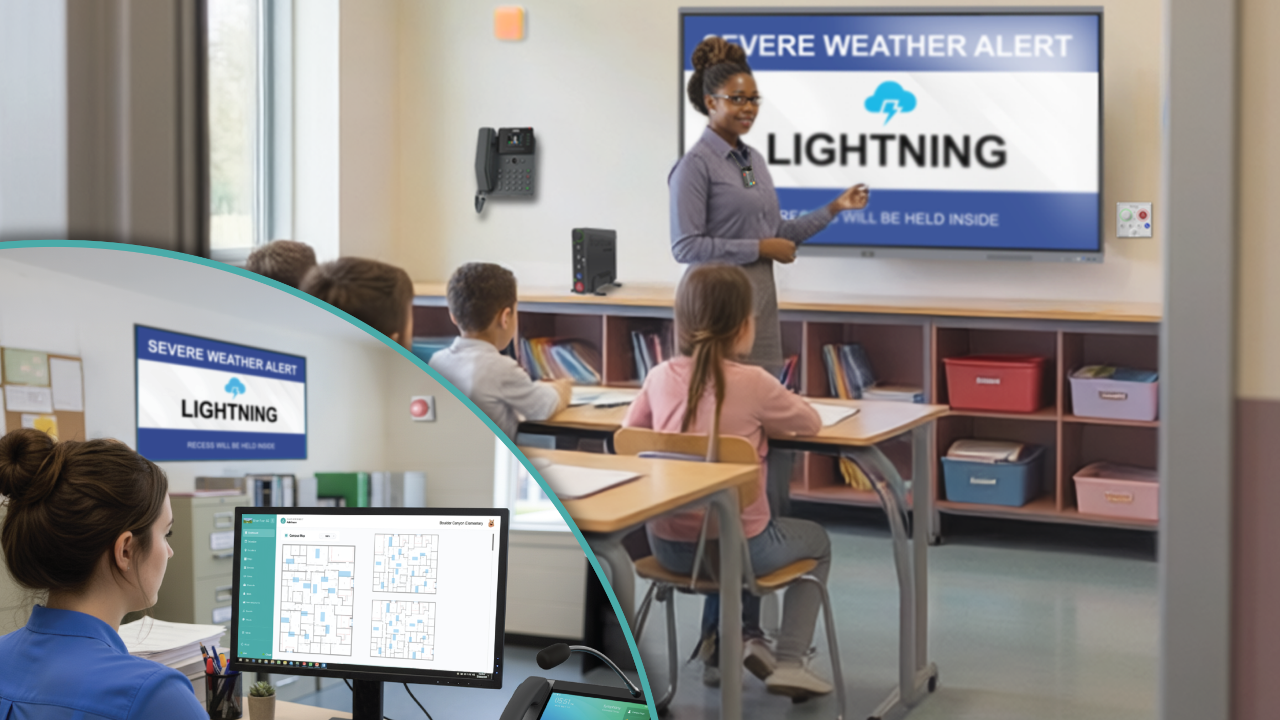
That changes with this release. Every audio and visual device now appears on a campus floor map with live health status. Healthy devices show solid. A device with a problem flags immediately, with the room and device name available on hover. No report required. No separate system.
For IT directors, this is a different kind of visibility than they’ve had before — infrastructure health as something you monitor continuously, not something you investigate after a complaint.
The platform now sees the district
Symphony now delivers a district-wide operations dashboard as a cloud service, accessible from any browser without additional on-premises infrastructure at each campus.
District leaders get a geographic map showing every school, color-coded status, and device health across all sites from a single login. The operational picture that previously required site-by-site access now lives in one place.
This is the clearest competitive differentiator in the release. Audio Enhancement’s DistrictView requires an additional server. Symphony’s district management is a managed cloud service — nothing to install, nothing to maintain per site. For multi-campus opportunities, that difference is direct and quantifiable.
The platform now alerts visually and audibly together
Symphony now coordinates audio and visual alert messaging through a single action. Alert templates configure in the cloud, push to the campus server, and execute locally — independent of internet connectivity. When an alert activates, visual messaging reaches every compatible device on the local network alongside the audio response.
TimeSign is the first device to support this capability. Additional compatible devices follow.
Two things worth noting for positioning: this is not a digital signage product and shouldn’t be framed as one. It’s visual alerting within the communication platform — the same system that handles bells and paging. Schools with existing displays see those investments become part of the safety response rather than a separate consideration.
The platform now gives scheduling control to the school
Administrators can sequence audio and visual actions, configure schedule-based announcements, and manage coordinated bell patterns across zones through a browser-based interface. No proprietary hardware. No programming.
The operational value is straightforward: schools can manage their own system without vendor involvement. That matters for TCO and for the long-term relationship between the school and its infrastructure.
Regulatory context
Alyssa’s Law is enacted in 11 states, with 18 more actively considering similar requirements. The PASS Guidelines 7th Edition, updated July 2025, introduced a Digital Infrastructure layer to school safety standards for the first time.
Symphony — with campus mapping, visual alerting, and district-level monitoring — aligns with both frameworks. Districts building on Symphony now are building on infrastructure positioned to meet these requirements as they expand.
The language that holds up in proposals: “Symphony aligns with Alyssa’s Law requirements and the PASS Guidelines 7th Edition Digital Infrastructure layer. Districts that standardize on Symphony are positioned to meet expanding compliance requirements without infrastructure replacement.”
What’s available
The Spring Release is available now as an update to existing Symphony Campus installations and ships with all new systems. Updated collateral — datasheet, brochure, and objection handler — is in the partner portal at channels.boxlight.com.
If you’re in a live opportunity and want a walkthrough of the new capabilities before a demo, reach out to your Boxlight channel manager.